










Ashampoo PDF Pro 4 (1 PC - Lifetime) - Multilingual - Ηλεκτρονική Άδεια


Ashampoo PDF Pro 4
Merge PDFs, convert them to Word, and edit them like text.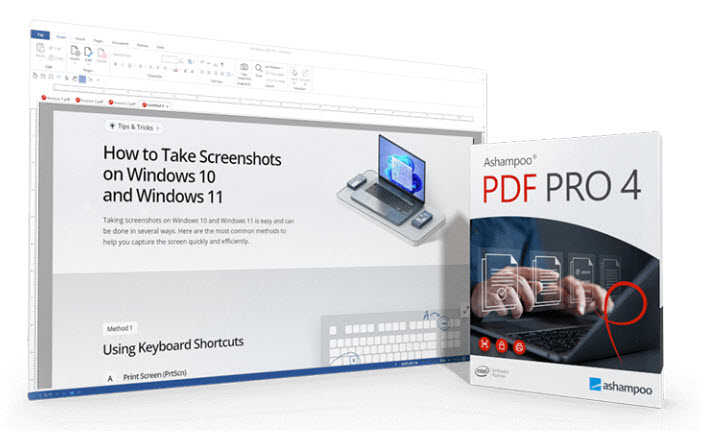 The best PDF software for your PDF files.
Ashampoo PDF Pro 4 is the complete solution for easy PDF editing. This PDF software includes all the tools you need to create, convert, edit, merge, and protect PDF files. With the PDF Creator, you can produce signed files that are readable everywhere, always at the optimal size, and can be secured with encryption. Create or modify interactive forms as you wish, or edit existing PDFs like a normal Word document!
- Edit PDFs like Word documents
- Text editing at the highest level
- New hyphenation for perfectly formatted texts
- Powerful spell checker with brand-new dictionaries
- Fast conversion to Word, Text, HTML
- Create and edit interactive forms
- Side-by-side comparison of two PDFs
- Copy PDF snapshots directly to the clipboard
- New snapshot system for perfect screenshots of PDF documents
- Legally compliant Bates numbering for documents and portfolios
- Easily combine multiple PDFs
Overview like in a web browser with tabs, direct comparison and fullscreen mode
PDF editing like in a modern office, more flexible than ever!
With Ashampoo PDF Pro 4, your documents are displayed as flexibly as in a web browser. Open and edit PDFs in convenient document tabs to quickly switch between your files. Displaying multiple pages side by side provides a perfect overview, ideal for comparison or parallel editing. Thumbnails with any magnification make it easier to navigate and find relevant content. Use the optional full-screen mode for uninterrupted editing—the perfect focus on your document!
Completely new spell checker, hyphenation aid and a convenient snapshot function
No more mistakes: Spelling and hyphenation on a new level
With the new spell checker and updated dictionaries, you always stay in control of your texts – mistakes are corrected in a flash. Improved hyphenation ensures that even long words are optimally adjusted to the line margin. Additionally, you can now not only save snapshots (excerpts) from your PDFs as files, but also copy them directly to the clipboard. This allows you to reuse content in other programs in a flash!
Edit as easily and quickly as in Word
Practical and elegant: the new ribbon interface of Ashampoo PDF Pro
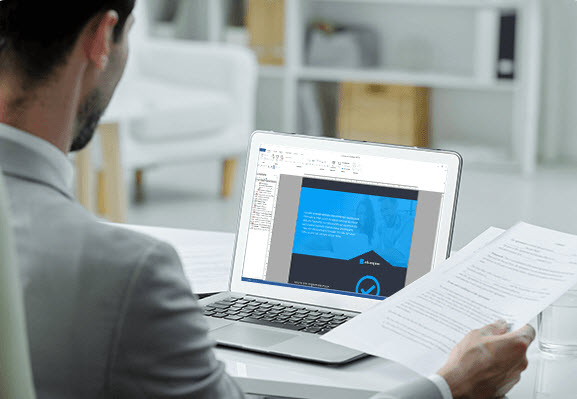
With Ashampoo PDF Pro, you can edit PDF documents as easily as with a top-notch word processor. Ashampoo PDF Pro features a new ribbon interface, similar to modern Office programs. Getting started and switching is absolutely seamless! You'll find the most important commands in locations you're already familiar with from Microsoft Word, Ashampoo Write, or other Office applications. Editing PDF files has never been easier!
Fantastic look
Use the new, eye-friendly "Dark Mode" in a deeply relaxed manner
Working on a screen is generally stressful for the eyes, and documents with large white spaces make it even more so! Ashampoo PDF Pro effectively alleviates this problem: With one click, the user interface can be switched to an eye-friendly, dark mode. This allows you to work longer and more productively with this program, even in professional use!
Merge, edit and rebuild PDFs
Ashampoo PDF Pro lets you convert PDF files the way you need them. This allows you to easily add, reorder, and delete pages. Cropping and rotating pages is also a breeze with this PDF editor. It's also incredibly easy to insert pages from other PDF files or combine multiple PDF files into one.
Easily create new PDFs
With integrated PDF printer for flexible PDF creation

Ashampoo PDF creates high-quality PDF files from any Windows program. Simply select "Print" in any program and select the PDF printer driver included with Ashampoo PDF. If particularly compact PDF files are required, for example, for online publication, Ashampoo PDF downscales the graphics to a lower resolution of your choice.
Well thought-out and completely individual redesign
The quick access toolbar is perfect for you!
If you've already worked with Ashampoo Office, you might already be familiar with the Quick Access Toolbar under the ribbon. In Ashampoo PDF Pro, the most important commands are also accessible with just one click. You can customize the selection of commands to your liking – you decide which functions you want to use to streamline your individual workflows. A good PDF program adapts to your needs, not the other way around!
Convenient conversion, no typing required
Conversion to Word or other compatible formats
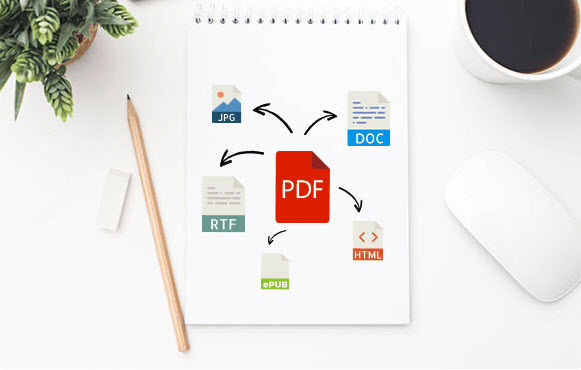
Ashampoo PDF converts your PDF files into text documents that you can edit with Microsoft Word or Ashampoo Office. Conversion to HTML, EPUB, JPG, or RTF is also possible. Ashampoo PDF Pro also converts scanned pages into editable and searchable PDF files using OCR.
Lightning-fast switching to work mode
Switch between modes with one click and use all important commands
The Quick Access Toolbar not only provides enough space for the commands you need most, but also displays the most important working modes at a glance. This lets you switch from text editing to hand or object mode and back in a flash. With just one click, you can decide how you want to edit your PDF document.
Ingeniously easy zooming in the status bar
Always use the desired size using the slider

Another customer request fulfilled! Ashampoo PDF Pro features a slider in the status bar that allows you to continuously adjust the magnification level to your liking. Incorrectly selected sections in the document window are now a thing of the past.
Edit texts flexibly with change tracking and spell checking
With Ashampoo PDF Pro, you can edit, add, delete, and format text in PDF files across paragraphs and pages. If desired, the program highlights changes in color with the built-in "Track Changes" feature for easier tracking. The integrated spell checker helps prevent misspellings, and automatic hyphenation ensures that text looks good.
Compact and versatile: numerous new folding elements
Simply open it and find the most important functions and commands right away!
Like a Swiss Army knife, Ashampoo PDF Pro's ribbon offers a variety of new pop-up elements. These provide you with the most important commands for your current workflow – clearly arranged and at a glance.
PDF/A – the secure standard
Create future-proof and legally compliant files: PDF/A export for permanent archiving
With Ashampoo PDF Pro, you're always on the safe side, because PDF/A has been standardized by the International Organization for Standardization! With support for the long-term archiving format PDF/A, you can create files that you can still open easily for years to come. This format is ideal for digitizing your most important documents and storing them securely for the long term.
Compare quickly and precisely
Better analysis and finding differences: the advanced document comparison
Ashampoo PDF Pro not only lets you view PDF documents side by side and scroll synchronously, but also goes a clever step further: By automatically highlighting differences between two documents in color, the program saves you time and effort when comparing two PDFs. A particularly useful feature: The differences found can also be clearly displayed in a sidebar, allowing you to easily jump to the relevant location. Don't miss anything again and find differences in no time!

Create trustworthy PDFs with digital signatures
Digital signatures for authentic documents you can trust!
With the help of digital signatures, you can make your documents "official" in Ashampoo PDF Pro. Your business partners, colleagues, and friends can be confident that the documents they receive from you are authentic and have not been subsequently altered. This ensures a consistently trusting collaboration.
System requirements:
Operating system:
Windows® 11, Windows® 10 (x64), Windows® 8 (x64), Windows® 7 (x64).
Requirements:
Any device that supports the operating systems listed above.
Other:
An internet connection is required to activate the program. The program license is reviewed periodically.
- Windows
Η τιμή δεν έχει αλλάξει ακόμα. Θα εμφανιστεί σε αυτό το γράφημα μόλις αλλάξει.
Δε βρέθηκαν Κριτικές
- Σχετικά προϊόντα
- Είδες πρόσφατα
© 2010 - 2026 Techbox. We ❥ new ideas